
PCB Soldering
- Mohamed Khaled

- Oct 8, 2018
- 3 min read
Updated: Oct 11, 2018
This task is to make a circuit containing a LED, Resistor and a button. When you click the button the LED lights up, by soldering the component into a PCB.
Circuit Component:
1. LED 3V.
2. Resistance.
3. Push Button.
5. Wires.
6. Battery.
What is Soldering?
Soldering, is a process in which two or more items are joined together by melting and putting a filler metal into the joint, the filler metal having a lower melting point than the adjoining metal. Soldering differs from welding in that soldering does not involve melting the work pieces.
What is soldering iron?
A soldering iron is a hand tool used in soldering. It supplies heat to melt solder so that it can flow into the joint between two work pieces. A soldering iron is composed of a heated metal tip and an insulated handle.
How to solder?
1. Solder needs a clean surface on which to adhere.
· Buff the copper foil of a PC board with steel wool before soldering.
· Remove any oil, paint, wax, etc. with a solvent, steel wool, or fine sandpaper.
2. To solder, heat the connection with the tip of the soldering iron for a few seconds, then apply the solder.
· Heat the connection, not the solder.
· Hold the soldering iron like a pen, near the base of the handle.
· Both parts that are being soldered have to be hot to form a good connection.

Figure 1. The tip of the soldering iron heats both the copper pad and the lead from the electronic component. Solder melts when placed in contact with the hot metals to be joined.
3. Keep the soldering tip on the connection as the solder is applied.
· Solder will flow into and around well-heated connections.
· Use just enough solder to form a strong connection.
4. Remove the tip from the connection as soon as the solder has flowed where you want it to be. Remove the solder, then the iron.
5. Don't move the connection while the solder is cooling.
6. Don't overheat the connection, as this might damage the electrical component you are soldering.
· Transistors and some other components can be damaged by heat when soldering. A crocodile clip can be used as a heat sink to protect these components.

Figure 2. By absorbing heat, the crocodile clip will reduce the heat that flows to the component, helping to prevent damage.
7. Soldering a connection should take just a few seconds.
· If it is taking longer, see the troubleshooting section below.
8. Inspect the joint closely. It should look shiny.
· If you are soldering a wire (called the lead) onto a PC board (on the track), it should have a volcano shape. See Figure 2.
· If the connection looks bad, reheat it and try again.

Figure 3. The solder in a good join will be shaped like a cone, with solid contact between the solder and all surfaces to be joined. Bad joins (also called dry joins) should be melted and remade.
9. Wipe the tip of the iron on a damp sponge to clean it. The tip should now be shiny.
10.Unplug the soldering iron when it is not in use.
My Work:
1. First you sketch the design on a paper to make sure that the connection will work out, then start soldering.

2. the component of the circuit:


LED Resistance Push Button

The Result:

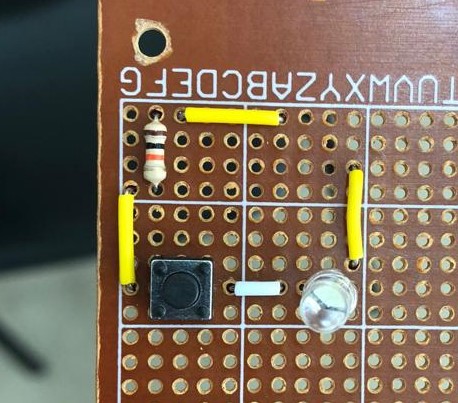


link: https://drive.google.com/open?id=1DW8USL_3vEeQjjMqUiVl-OyIq-VdktL3


Comments